- Rust 99.6%
- Nix 0.4%
| Filename | Latest commit message | Latest commit date |
|---|---|---|
| .github | ||
| img | ||
| src | ||
| templates | ||
| tests | ||
| .envrc | ||
| .gitignore | ||
| AGENTS.md | ||
| Cargo.lock | ||
| Cargo.toml | ||
| example_data.json | ||
| flake.lock | ||
| flake.nix | ||
| LICENSE | ||
| README.md | ||
| rustfmt.toml | ||



Local-first portfolio management for humans and AI agents — written in Rust.
portfolio_rs is a CLI + interactive TUI for tracking financial investment
portfolios, and a toolkit for the AI era: machine-readable investment
policies, policy-aware reviews, rebalancing simulations, durable financial
memory (diary, decisions, reports), a portable agent skill, and a local HTTP
API. It is also a Rust library that GUIs (e.g. a desktop app) can embed.
This project is the modern successor of finance.
Installation
Available in nixpkgs: nix-shell -p portfolio_rs or nix run nixpkgs#portfolio_rs
Install via pkgx: pkgx portfolio_rs
Install from cargo: cargo install portfolio_rs
Quick Start
Simple mode: a single positions file
Create a JSON file with your portfolio positions (see example data for the schema), then launch the TUI:
portfolio_rs my_positions.json
Workspace mode: a durable finance workspace
For the full experience — policies, diary, decisions, and reports — create a workspace:
portfolio_rs init-workspace my-portfolio
portfolio_rs policy init --strategy balanced-growth my-portfolio
portfolio_rs context my-portfolio/positions.json
This creates a directory with an INVESTMENT_POLICY.md (your financial
constitution), a machine-readable portfolio/policy.toml, folders for diary
entries, decision records, theses, and reports, agent instruction files
(AGENTS.md, CLAUDE.md), and a .gitignore that protects your private
data.
Commands
| Command | Description |
|---|---|
portfolio_rs [FILE] |
Interactive TUI (default) |
balances [FILE] |
Balances table with PnL |
allocation [FILE] |
Allocation pie chart and breakdown |
performance [FILE] |
Performance metrics (YTD, total return) |
sort [FILE] |
Positions sorted by value (display only) |
context [FILE] |
Agent-friendly portfolio briefing (Markdown/JSON) |
review [FILE] |
Policy-aware review: drift, violations, actions |
simulate [FILE] |
Rebalancing what-if scenarios (never trades) |
validate [FILE] |
Validate a portfolio JSON file |
policy init/validate |
Create/check a machine-readable policy.toml |
decision draft |
Draft a structured decision record |
report weekly |
Generate a weekly Markdown report |
doctor [DIR] |
Workspace health check |
init-workspace [DIR] |
Create a new finance workspace |
agent init/skill |
Agent instructions + portable skill management |
api |
Local HTTP API server |
mcp |
Read-only MCP server for AI agents (stdio) |
snapshot |
Record today's valuation for get_performance (<data-dir>/<portfolio>/snapshots.jsonl, 0600) |
config |
Show config file location |
components |
List TUI components for --disable |
If no file is specified, commands use the portfolio file (or workspace) from
your config. Run portfolio_rs <COMMAND> --help for details.
Quotes come from Yahoo Finance by default. Set PORTFOLIO_RS_QUOTES to choose
another source: offline makes no network calls (nothing gets a price), and
fixture:<path> serves prices from a JSON file with the shape of
tests/fixtures/quotes_example.json. An
invalid value prints a warning and uses offline quotes; it never falls back to
the network.
PORTFOLIO_RS_QUOTES=fixture:tests/fixtures/quotes_example.json portfolio_rs context example_data.json
performance period returns (1W, 1M, 3M, 6M, YTD, 1Y) are the market return
of the ticker positions you hold now, at current quantities, compared like for
like: cash, ticker-less holdings, unpriced positions, and positions without a
price at the period start are left out of both sides. Deposits, withdrawals,
and trades during the period are not accounted for. 1D and "Since" compare
total portfolio values (including cash).
AI & Agent Integration
portfolio_rs is designed to be operated by coding agents and LLMs, locally:
-
Structured output:
context,review, andsimulatesupport--format json(camelCase) for scripts and agents, and Markdown for humans and LLM prompts.portfolio_rs context positions.json --format json portfolio_rs review positions.json --policy portfolio/policy.toml --format json -
Machine-readable policy:
portfolio/policy.tomlencodes your goals, risk profile, target allocations, and constraints. Strategy templates:balanced-growth,capital-preservation,aggressive-growth,custom. -
Portable agent skill: install the built-in
portfolio-rsskill into any agent harness that supports skill files (opencode, Claude Code, Cursor, ...):portfolio_rs agent skill export ~/.config/opencode/skills -
Workspace instructions:
portfolio_rs agent initcreatesAGENTS.mdandCLAUDE.mdwith local paths and safety rules (no trades, no broker interaction, private data stays local). -
Durable memory: decisions and reports are plain Markdown files in your workspace — reviewable in six months, greppable forever. Use
--dry-runto preview any file mutation. -
MCP server:
portfolio_rs mcpserves your portfolio read-only to MCP clients over stdio (see MCP server).
MCP server
portfolio_rs mcp starts a local, read-only Model Context Protocol
server on stdio. The MCP client spawns it as a child process; JSON-RPC goes over
stdin/stdout and diagnostics go to stderr. A line that is not JSON gets a
JSON-RPC -32700 parse error (id: null) and the server keeps serving; a
tools/call without a name or with non-object arguments gets -32602; a
batch (JSON array) or other non-object message gets -32600 (id: null),
since MCP does not support batching. Wrong argument types and unknown
fields are tool errors with code invalid_argument. Only tools and resources
are served (no prompts). With --offline or a quote fixture every tool reports
openWorldHint: false. It never writes your positions file or the
app config (the only file it writes is the quote cache below), and it has no
network listener.
portfolio_rs mcp example_data.json                    # one positions file
portfolio_rs mcp example_data.json --policy policy.toml
portfolio_rs mcp --workspace ~/finance                # positions.json + portfolio/policy.toml
portfolio_rs mcp --offline --portfolio demo example_data.json   # portfolio id (default: main)
portfolio_rs mcp --data-dir /tmp/pf-history example_data.json  # snapshots for get_performance
With no FILE or --workspace, it serves the configured workspace (if the last
mode was workspace) or the configured portfolio file. --policy has no
default, so nothing is picked up from the current directory.
Last-known-price cache
Every successful quote fetch is stored in .<datafile>.quotes-cache.json next
to the positions file (e.g. .positions.json.quotes-cache.json), written
atomically with mode 0600. It holds, per symbol, the price, previous close,
currency, asOf and fetchedAt, plus the FX pairs (EURUSD=X, ...) in a
separate fx map; no quantities or other portfolio data. When a fetch fails,
the cached value is used if it is younger than the max age (default 7 days,
measured from asOf): the position gets priceSource: "cache", priceStatus: "cache" and
the cached priceAsOf. Coming from the cache is informational only: a price (or FX
rate) is stale when its asOf is older than --stale-after days (default 3,
which covers a weekend), wherever it came from; stale positions get
isStale: true and priceStatus: "stale". An unknown asOf is not stale.
Stale prices count toward complete; every response adds hasStale,
stalePositions and priceAsOf (the oldest price used).
The cache also keeps the historic closes used to fill missing purchase prices,
so cost basis and PnL survive offline runs. Their keys are
SYMBOL|on|YYYY-MM-DD / SYMBOL|before|YYYY-MM-DD, so the cache file reveals
purchase dates (no quantities); treat it like the data file. Entries are only served with a
positive price, a timestamp at most one day in the future and (for quotes) a
currency; a cache file with an unknown version is ignored with a warning.
The HTTP API (portfolio_rs api, including /api/context) reads the same
cache next to its data file, read-only (default max age, never written;
not next to a .gpg file).
Without an FX rate for its quote currency a position keeps its native price,
priceCurrency, priceAsOf and day change (priceStatus: "fx_unavailable");
only base-currency values (valueBase, weightPercent, ...) are null. Its
priceSource and isStale still describe that native price.
portfolio_rs mcp --cache-max-age 3 example_data.json   # days, 0 disables fallback
portfolio_rs mcp --stale-after 1 example_data.json     # asOf older than 1 day is stale
portfolio_rs mcp --no-cache example_data.json          # neither read nor write
portfolio_rs mcp --offline example_data.json           # read the cache, never fetch
Quote fixtures do not use the cache, and encrypted (.gpg) files never get one,
so no plaintext ticker list ends up next to an encrypted portfolio. The cache
pattern is in the workspace .gitignore template and checked by doctor.
Performance and snapshots
get_performance reports a period's change split into netContributions,
marketEffect (price and FX on market positions), incomeEffect and
manualRevaluation; change always equals their sum (within 0.01).
Periods: day, week (last 7 days), month (last 30 days), mtd, ytd,
1y, since_inception and custom (with from and to, YYYY-MM-DD).
groupBy is none, assetClass or position (position rows carry name and
ticker). Breakdown rows also split netContributions into
internalTransfers (between tracked positions: a buy paid from tracked cash is
internal for both the security's class and Cash), externalFlows (into or out
of the portfolio) and externalUnknown (positions that appeared or vanished
without a transaction). The split is computed per snapshot step and summed; a same-step deposit and buy without dated cash deposits goes to externalUnknown. A non-zero externalUnknown is flagged by one performance_approximate note (detail.reason: external_unknown_flows). With insufficient_history, endValue still holds a known end value.
The start value is the last stored snapshot dated before the period's
requested start, at most maxStartAgeDays days before the day before that
start (default: day/week 3, month/mtd 5, ytd/1y 10; custom by
its length). The requested start is today for day, today minus 6 days for
week (last 7 days), and the from argument for custom. When that
snapshot is used, the response from and dataCoverage.startPointDate are
its date (the actual base the figures are measured from). Without a usable
start, from stays the requested start and startPointDate is null. Always
from <= to. Lookups (start age, the transaction window (start, end])
stay on the requested period, not the reported from. An older snapshot
than maxStartAgeDays allows gives insufficient_history (complete
false, dataStatus: insufficient_history), and a start before the day
before the requested start adds a start_point_gap note. The end is
today's live valuation, or for a past to the last snapshot inside the
requested window (none: insufficient_history).
dataCoverage.snapshotDays counts valuation points in the reported
[from, to], the same way for every period: every stored snapshot in that
window inclusive (the base snapshot counts when from is its date), plus
today's live valuation once when to is today and no snapshot is stored for
that date. Without a base point the window is the requested [from, to].
missingDays is the calendar days in [from, to] that are not one of those
points.
A non-cash position held at
the start that is gone with no sell entry (vanished_position) is booked as an
unknown external flow, never a loss, and the figures are partial. Likewise a
position missing from the start snapshot with no purchase dated in the window
(untracked_position, e.g. a buy recorded late): flows follow transaction
dates, never a position's first appearance in a snapshot. Each snapshot
records per position the net buys minus sells dated up to its date
(ledgerBase); when today's purchase list gives a different amount, the
ledger was edited afterwards and ledger_changed marks the figures partial. A change of
baseCurrency between the snapshots of the period gives base_currency_changed
and null, partial figures. Contributions are buys minus
sells dated in that window (from the purchases) plus the change in cash
balances, so a deposit is never return, and interest or dividends paid to cash
count as contributions (incomeEffect is 0 until there is an income ledger).
twrPercent is chained daily (method: daily_twr) when there is a snapshot
for every day, otherwise Modified Dietz over the stored points
(modified_dietz, flagged by a performance_approximate note), with each buy or sell
weighted at its transaction date and each cash change (or flow without a dated
transaction) at the snapshot that shows it. A buy or sell without a recorded
price is valued at the historic close of its date, also flagged by a
performance_approximate note (detail.reason: estimated_transaction_price).
A manual-position transaction without a price is valued at the last snapshot's
unit value (or Amount/Quantity) when the snapshot quantities agree, otherwise
booked as externalUnknown, flagged by a performance_approximate note
(detail.reason: estimated_manual_value). Dates (from, to and every
snapshot date) must be strict YYYY-MM-DD. Snapshot lines with bad JSON, a
looser date, a missing field (such as a null totalBase), a negative position
valueBase, or a totalBase more than 0.05 off the sum of the positions are
skipped and counted in dataCoverage.skippedLines, with a
snapshot_lines_skipped warning naming each line's reason (detail.lines)
because they can move the start point. portfolio_rs snapshot keeps such
implausible lines in the file untouched.
fxEffect and mwrPercent are null for now, and nothing is reconstructed from
historic closes (reconstructed: false).
Figures are null, never 0, when they are unknown: no usable start snapshot
(insufficient_history, dataStatus: insufficient_history, complete
false; endValue still holds a known end value), or a missing price or FX
rate in the start or end valuation (performance_partial, dataStatus: partial). A stale start, end or live price makes dataStatus: stale.
insufficient_history is a get_performance-only dataStatus; other tools
still report only complete, partial or stale. endValue is the sum of
the rounded per-position values, so it matches get_positions totalValue
for the same valuation.
The MCP server only reads snapshots. Write them with:
portfolio_rs snapshot example_data.json --data-dir /tmp/pf-history
portfolio_rs snapshot --workspace ~/finance       # same portfolio selection as `mcp`
Each run values the portfolio and stores one line per day (a second run that
day replaces it) in <data-dir>/<portfolio>/snapshots.jsonl, written
atomically with mode 0600 (the directory, and any parents the snapshot
creates, get 0700); cash quantity is the balance (Amount). totalBase
and cashBase are the sum of the rounded position valueBase figures (the
same cents as get_positions). The data dir is
--data-dir, else PORTFOLIO_RS_DATA_DIR, else <workspace>/portfolio/history
in workspace mode, else $XDG_DATA_HOME/portfolio_rs (~/.local/share/portfolio_rs);
never the current directory. Pass the same --data-dir to mcp. A daily cron
entry:
55 23 * * * portfolio_rs snapshot --workspace ~/finance
Do not add --offline to a cron entry: cached prices expire, and the
snapshots then turn incomplete. An incomplete snapshot never replaces a
complete one for the same day; snapshot warns and keeps the complete
line. Each line is
{date, baseCurrency, positions: [{positionId, kind, assetClass, quantity, price, priceCurrency, fxRate, valueBase, ledgerBase}], cashBase, totalBase, netFlowsBase, complete, dataStatus}. The workspace .gitignore template covers
/portfolio/history/, snapshots.jsonl and .snapshots.jsonl.tmp-*, and
doctor warns when they are missing or tracked by git.
Client configuration
Most clients (Claude Desktop, Cursor, opencode, ...) take a command, arguments and environment. A demo setup with the bundled fake data and offline quotes:
{
  "mcpServers": {
    "portfolio": {
      "command": "portfolio_rs",
      "args": ["mcp", "--portfolio", "demo", "/path/to/portfolio_rs/example_data.json"],
      "env": { "PORTFOLIO_RS_QUOTES": "offline" }
    }
  }
}
Use absolute paths: clients start servers from an arbitrary working directory.
For deterministic prices without network access, point the env var at a quote
fixture, e.g. "PORTFOLIO_RS_QUOTES": "fixture:/path/to/portfolio_rs/tests/fixtures/quotes_example.json".
Drop the env entry to use live quotes (Yahoo Finance).
Tools
All tools are read-only. Outputs are camelCase JSON with schemaVersion,
portfolioId, asOf (RFC 3339), baseCurrency and warnings; unknown values
are null, never 0. Every tool accepts an optional portfolioId.
Money totals (get_positions totalValue and cashValue, get_allocation
totalValue and class value, snapshot totalBase and cashBase,
get_context summary totals, get_performance endValue) are the sum of
the rounded per-position values, rounded once more, so they match to the
cent. Percentages stay computed from unrounded values.
Missing quotes or FX rates are never hidden: every response carries
complete (false when any position is unpriced) and dataQuality
(missingPrices, missingFx, affectedPositions, affectedClasses).
Totals then cover only priced positions; a class with an unpriced position has
a null value. No percentage (position weightPercent, context class and cash
percentages), drift or amountToTarget is derived from such a partial total; each class gets actualPercentMin/actualPercentMax instead:
its possible share whatever the excluded positions are worth: from 0 up to
unbounded. An estimate (cost basis, or a cache entry past max-age) is never a
bound, because a position can gain far more than any factor; only a native
price fresh within the cache max-age (excluded for want of an FX rate) bounds
a position at twice its value. A band status
(above_band, below_band, within_band) is set only when it holds for the
whole range, otherwise unknown. get_allocation lists the left-out
positions in excludedPositions and their estimated share in
excludedValueShare (last cached price at any age, else cost basis;
excludedValueBasis: last_price | cost_basis | cost_basis_assumed_base;
null without an estimate). The cost basis is converted from the quote
currency, the cached currency or the position's optional recorded
"Currency"; with none of them it is assumed to be in the base currency
(cost_basis_assumed_base). There is no historic FX, so a foreign cost basis
uses the current FX rate (fetched even when only excluded positions need it)
and is listed in cost_basis_current_fx detail.estimatePositionIds.
check_policy reports a breach only when it is certain (detail.basis: "partial"); a band or limit that might be violated is a possible_breach
warning (at most one per class and limit, with the priced-only percent in the
message). When the excluded positions' estimated share is below
--possible-breach-min-share percent (default 0.5), everything is judged on
the priced part with normal severity instead, and a checks_incomplete note
with detail.basis: "priced_part" says so. A last-price estimate counts as
is; a cost-basis estimate is first multiplied by its class's plausible-gain
factor (default 3 for funds, ETFs, bonds, gold and commodities; crypto, stocks
and other classes have none, so their cost-basis estimate is never immaterial
and they get the certain-breach/possible_breach treatment). Override per
class with --gain-factor CLASS=FACTOR or CLASS=never (repeatable; the last
flag for a class wins; FACTOR must be a finite number >= 1; a class with no
holding is an unknown_gain_factor_class note). The
note reports detail.materialityShare and detail.gainFactors (a class
holding the unpriced position that is below its band is then a
possible_breach). checks_incomplete summarizes what
was judged on a partial basis; it is a data-quality warning (top-level
warnings only), so policyStatus is warnings only for real policy
findings such as a possible_breach.
networkStatus (in every tool response and in get_context, also via /api/context) is connected (every market position has a fresh quote and FX
rate), partial (some fresh quotes, or quotes without FX) or offline (no
fresh quotes; cached prices do not count as connected); under a quote fixture
(PORTFOLIO_RS_QUOTES=fixture:<path>) it is always fixture. Each position row
carries priceSource (live, cache, fixture or none) and isStale.
Every response also carries dataStatus: complete, partial (some
position unpriced) or stale (all priced, but some older than --stale-after; a
stale_prices data-quality warning lists them and the context table marks
them (stale)). get_performance may also report insufficient_history
when it has no usable start snapshot (complete is then false); other tools
never use that value. check_policy keeps policy and data quality apart:
policyStatus (ok | warnings | breaches), findings, counts and
breaches cover policy findings only; data-quality warnings appear only in
the top-level warnings (subject to minSeverity).
The policy's single_position_limit_percent applies to non-cash positions
only, identically in portfolio_rs review, check_policy and the
get_context risk flags (which fall back to 25 % without a policy). Cash is
governed by the cash-buffer and asset-class rules instead.
| Tool | Returns |
|---|---|
get_positions |
Positions with price status, value in base currency, weight, cost basis and P&L, currency per row (base currency for cash), priceAsOf (provider timestamp, null when not reported); portfolio-level invested, unrealizedPnl, unrealizedPnlPercent, dayPnl summed over the priced market positions, pnlPartial: true when a position is left out. Filters: assetClass, includeManual; sortBy value/name/pnl/dayChange (value ties and unpriced rows by name, the same order as get_context) |
get_allocation |
Allocation by asset class against policy targets and bands, drift and amount to target |
check_policy |
Policy findings with stable codes and severities, constraint checks, overall status (ok/warnings/breach); one deduplicated list (policy findings + warning-severity data quality, filtered by minSeverity) feeds findings (policy part), breaches (critical), top-level warnings (warning severity), counts and status, so counts.warning = warnings length and counts.critical = breaches length; cashBuffer {minimum, actual, surplus} against minimum_cash_amount (also in get_context); minSeverity filter |
get_transactions |
Buys and sells synthesized from purchase history; cash entries are deposit/withdrawal at par (a cash position without entries is one opening deposit with synthesized: true, dated at the earliest purchase date or else the file date, reported in dateSource: earliest_purchase |
list_portfolios |
The served portfolio with its dataStatus and quoteSource (yahoo, offline or fixture; paths only with includePaths) |
get_performance |
Change over period split into netContributions, marketEffect, incomeEffect and manualRevaluation, with twrPercent, method, dataCoverage and an optional breakdown (see Performance and snapshots) |
get_context |
The portfolio_rs context report as Markdown or JSON (money and percentages rounded to 2 decimals, as in /api/context). When a position is unpriced, summary.incomplete carries a banner (also the first line of the markdown) and cashPercent, cash weights and largestPositionPercent are null |
Errors come back as tool results with isError: true and
{"error": {"code", "message"}}, codes unknown_portfolio,
invalid_argument (also an assetClass that no position or policy uses) and
not_found (an unknown positionId). Error and finding messages never contain amounts.
Resources
| URI | Content |
|---|---|
portfolio://<id>/context.md |
Portfolio context report (Markdown) |
portfolio://<id>/policy |
Parsed investment policy (JSON), when one is loaded |
portfolio://<id>/policy.md |
Workspace INVESTMENT_POLICY.md, when present |
portfolio://schema/positions |
JSON Schema of a position row |
portfolio://schema/findings |
Finding schema and the catalog of finding codes |
HTTP API
Serve your portfolio to local scripts, agents, and GUIs:
portfolio_rs api positions.json [--policy portfolio/policy.toml] [--host 127.0.0.1] [--port 3000] [--token-file PATH]
| Endpoint | Description |
|---|---|
GET /health |
Liveness check |
GET /api/portfolio |
Full portfolio summary, with complete, hasStale and dataStatus |
GET/POST /api/positions |
List / create positions |
GET/PUT/DELETE /api/positions/{id} |
Read / update / delete a position by stable pos_ id (positionId; a numeric index still works) |
GET /api/allocation |
Allocation breakdown |
GET /api/performance |
Performance metrics |
GET /api/context |
Agent briefing (JSON) |
GET /api/review |
Policy review (requires --policy) |
GET /api/simulate |
Rebalance simulation (requires --policy) |
GET /api/validate |
Portfolio file validation |
GET /api/doctor?dir=DIR |
Workspace health check |
POST /api/refresh |
Force a live quote refresh |
Notes:
- The API is intended for local use only; binding to a non-loopback host
prints a loud warning. Requests must use
Host: localhost:<port>,127.0.0.1:<port>or[::1]:<port>(anything else gets421), which blocks DNS-rebinding attacks from web pages. --token-file PATHturns on bearer auth: a random token is written toPATH(mode 0600, never printed or logged) and every/api/*request needsAuthorization: Bearer $(cat PATH)(401otherwise)./healthstays open.- Positions carry a stable
positionId(pos_…, generated if missing and persisted on the next save; a storedIdalways wins). Generated ids of market positions derive from ticker and asset class only, so renaming a position keeps its id; cash and manual positions use name and asset class. Use it in/api/positions/{id}. The numericidis the array index, kept for older clients. - Purchase
priceis the recorded price only; prices estimated from historic closes arenull. - Position mutations are persisted back to the portfolio file — except for
.gpgfiles, which are never rewritten. - Live quotes are cached for a short TTL;
POST /api/refreshbypasses the cache. - Application config is not an API payload. Embedding clients that read
AppConfigDtostill never receive the LLM API key:llmApiKeyis alwaysnull, andhasLlmApiKeyreports whether a non-empty key is configured. A null or missingllmApiKeydoes not clear a stored key; an empty string passed toAppConfig::set_llm_api_key(orAppConfigDto::apply_to) does.
Library Usage
The crate is also a library: state::AppState is an embedding-friendly
facade used by the HTTP API and external GUIs (e.g. a Tauri desktop app).
It loads portfolios/workspaces/policies, does position CRUD, and runs every
analysis (context, review, simulate, doctor, validate, reports) with
camelCase-serializable DTOs.
use portfolio_rs::AppState;

async fn total_value() -> eyre::Result<f64> {
    let state = AppState::new("EUR".to_string());
    state.load_file("positions.json").await?;
    let summary = state.get_portfolio_summary().await;
    Ok(summary.total_value)
}
TUI Features
The interactive Terminal User Interface (default mode) provides:
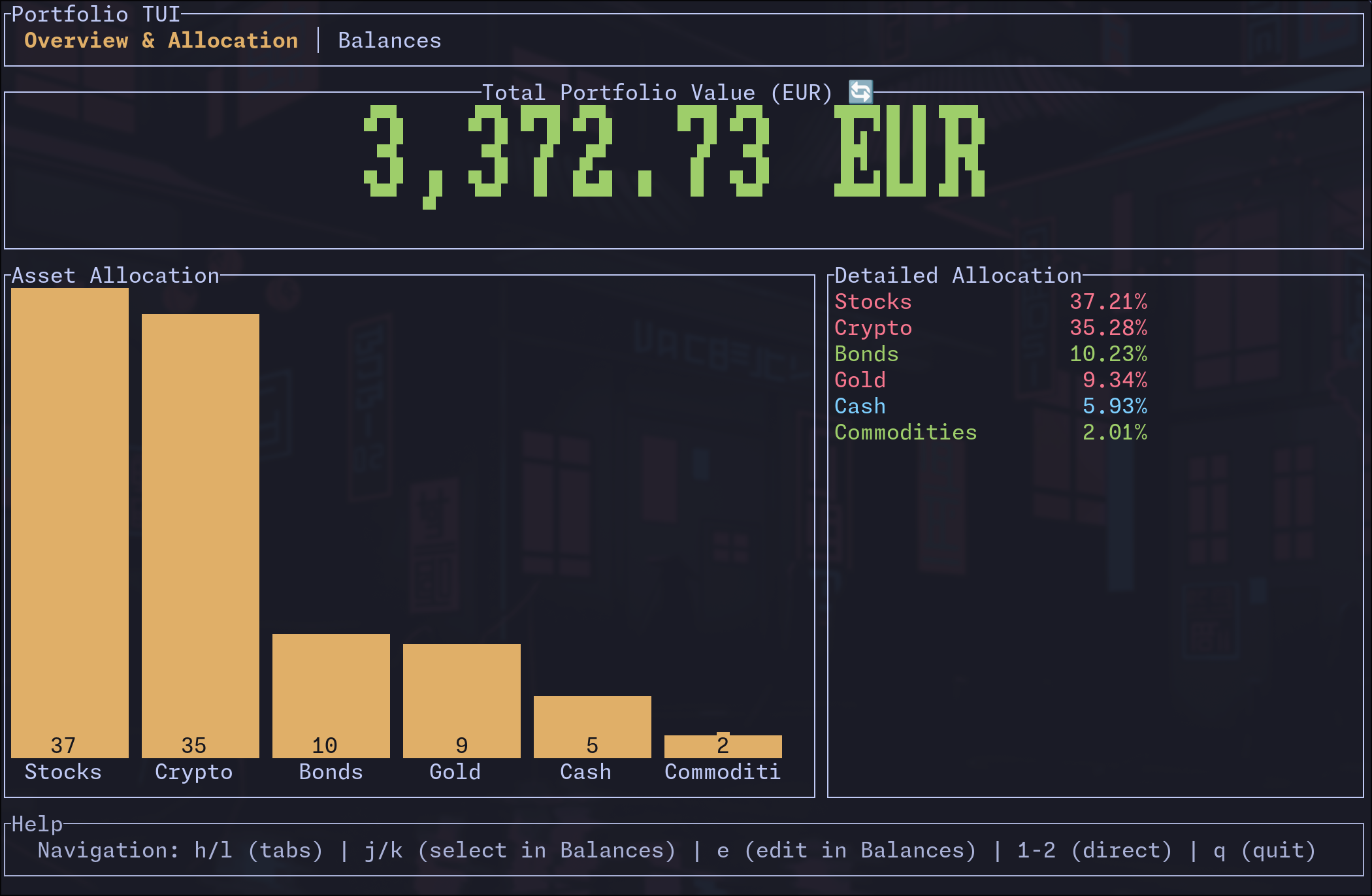
- Overview & Allocation Tab: Large display of total portfolio value, visual bar chart, and detailed allocation breakdown
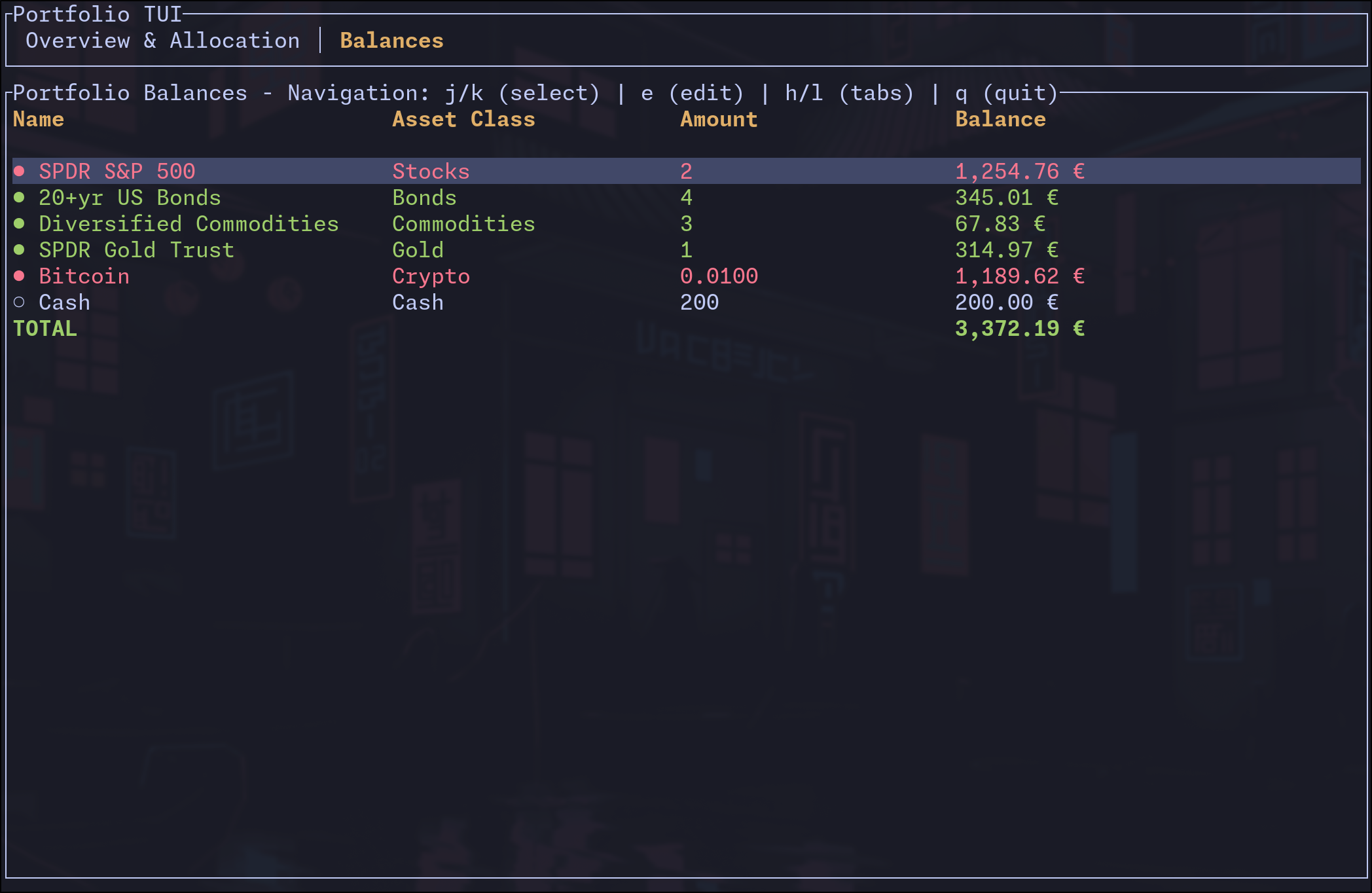
- Balances Tab: Detailed table of all positions with amounts, current values, and edit functionality
TUI Customization
You may optionally specify which tab to open at start-up:
portfolio_rs [JSON_FILE] --tab overview     # Start on Overview & Allocation tab (default)
portfolio_rs [JSON_FILE] --tab balances     # Start on Balances tab
You can disable specific UI components using the --disable flag with comma-separated component names:
Overview Tab Components:
tab_bar- Top navigation tabstotal_value- Large portfolio value displayasset_allocation- Visual bar chartdetailed_allocation- Allocation percentage listhelp- Help text at bottom
Balances Tab Components:
tab_bar- Top navigation tabsname- Position name columnasset_class- Asset class columnamount- Amount/quantity columnbalance- Balance/value column
Examples:
# Hide tab bar and help text
portfolio_rs --disable tab_bar,help example_data.json

# Show only the allocation chart (hide detailed list)
portfolio_rs --disable detailed_allocation example_data.json

# Minimal balances view (name and balance only)
portfolio_rs --disable asset_class,amount example_data.json
TUI Navigation
h/l: Switch tabs left/right (vim-style)j/k: Navigate up/down (select positions in Balances tab)e: Edit selected position amount (in Balances tab)Tab/←→: Switch between tabs1-2: Jump directly to specific tabsq/Esc: Quit the application
Edit Functionality
- Select any position with
j/kand presseto edit - Real-time balance preview and input validation
- Changes are saved automatically to your data file
- Supports decimal precision for crypto and fractional shares
Screenshots
Overview & Allocation Tab
Balances Tab with Edit Functionality
Demo

Configuration
Upon first run, portfolio_rs will create a default config file.
Use portfolio_rs config to show the config file location.
The most useful config entry is portfolio_file where you can set the
absolute path to your data file. This will be used when no file is
specified as an argument. Workspace users can point workspace_dir at their
workspace instead; the workspace's positions.json then takes precedence.
llm_api_key lives in the same file but is a write-only secret. The
AppConfigDto JSON view used by GUIs always serializes it as null and
exposes hasLlmApiKey instead. To clear a stored key, set it to an empty
string. A null or omitted key on an update does not wipe it.
currency (default EUR) is the base currency for totals. Quotes in another
currency (as reported by Yahoo) are converted with one FX quote per currency,
e.g. EURUSD=X; only the ticker symbol is sent. Prices and average cost are
shown in the quote currency (e.g. 512.30 USD); values, invested amounts, and
totals are in the base currency. Purchase prices are treated as quote-currency
prices and converted at the current FX rate, so cost basis ignores past FX
moves (MCP responses flag this as cost_basis_current_fx). If an FX quote, or
the quote currency itself, is unknown, the affected positions are flagged, their
invested amount is null, and they are excluded from totals rather than mixed in
unconverted.
Bonus: GPG Encryption
This tool supports (gpg) encrypted json files. Decrypted values are never written to disk.
# you will need a valid gpg key in ~/.gnupg/
portfolio_rs [COMMAND] data.json.gpg
Pro Tip: Use a plugin like vim-gnupg for editing your data file.