No description
  • Rust 78.5%
  • JavaScript 6.6%
  • TypeScript 4%
  • HTML 4%
  • Shell 2%
  • Other 4.9%
Find a file
Repository files (latest commit first)
Filename Latest commit message Latest commit date
Ryan Vogel 9d26cbdb87
iOS: fix six TestFlight tester issues (audio error, leaked error text, Live Activity, haptics, capitals, push to talk) (#2035)
* iOS: retry '!int' audio activation mixable and show audio errors as sentences

TestFlight testers saw "The operation couldn't be completed. (OSStatus error
560557684.)" in the keyboard strip and the app's setup card. 560557684 is
'!int' (AVAudioSession cannotInterruptOthers): a non-mixable session (the
Bluetooth-microphone .record category) going active from the background while
another app plays or records.

- AudioBackend: when setActive(true) fails with '!int', set .playAndRecord
  with .mixWithOthers (keeping HFP when Bluetooth is allowed) and activate
  once more, so the warm keepalive and captures start alongside the other
  app's audio instead of failing.
- New UserFacingError (HEXShared, app and keyboard): AVAudioSession codes map
  to short sentences ("Another app is using audio. Try again."); other
  microphone errors get "Hex couldn't start the microphone. Try again.";
  transcription and model errors keep their description only when it reads
  as a sentence, never Foundation's "couldn't be completed (… error N)" or a
  Swift type name.
- DictationController: every error it shows (phase .failed and the
  keyboard's message) goes through UserFacingError instead of
  localizedDescription.

Verified: xcodebuild test on the iPhone 18 Pro simulator, 179 tests pass,
including new tests for the code-to-sentence mapping and for a warm session
whose keepalive throws '!int' reaching the app and keyboard snapshot as
"Another app is using audio. Try again.". The background '!int' retry itself
needs a physical iPhone (music playing, Bluetooth mic allowed, warm session).

* iOS: end empty dictations quietly and keep error text human in the keyboard

Tapping Done (or ✕) in the keyboard's dictation screen without speaking
showed "Transcription failed: HEXKeyboard.(unknown context at $1…)": the
in-keyboard path printed the error's domain (a private Swift type name),
code and description for Apple Speech's "no words" result.

- New EmptyCapture rule (HEXShared): a capture under 0.3 s (or none at all)
  is a tap, and an engine's no-speech error or a cancellation means nothing
  was said; both end quietly. Engines say so through NoSpeechError
  (Parakeet's and Apple Speech's emptyTranscript, the keyboard's
  KeyboardSpeech.Failure.empty).
- KeyboardLocalDictation: Done before the microphone came up, or a capture
  too short to hold a word, returns to idle without transcribing (and a late
  "started" from WebKit stops the capture instead of opening a file);
  no-speech ends quietly; a transcription error from a cancelled or
  superseded job is dropped; every other failure shows a sentence from
  UserFacingError or the keyboard's own copy, while the probe log keeps the
  domain and code. KeyboardSpeech.Failure's descriptions are now sentences.
- DictationController (warm session and app): an engine's no-speech error
  returns to Ready with no message instead of failing.

Verified: xcodebuild test on the iPhone 18 Pro simulator after rebasing onto
origin/dev (bba07c64), 210 tests pass (1 skipped as before), including new
tests for the empty-capture rule and for a warm keyboard dictation whose
transcriber hears nothing (Ready, no message) next to one that fails (a
sentence). The in-keyboard WebKit capture path needs a physical iPhone.

* iOS: start Live Activities only for system dictations and end them reliably

Testers saw Hex's activity (dots + ✓, expanded "Copied") stay in the
Dynamic Island, even with Keep mic warm Off. The ✓/Copied look is the
widget's stale rendering of an activity nobody ended: every recording
(keyboard warm dictations and in-app ones included) requested an activity,
and the end ran in a detached task that a suspending app (microphone just
released) could skip, so it went stale and stayed for hours.

- DictationController requests an activity only for dictations that copy
  (Action Button, Control Center, Siri/Shortcuts); the keyboard and the app
  show their own recording UI. Removed: the activity for keyboard and in-app
  dictations.
- LiveActivityCoordinator: ending (cancel, failure, short capture, warm
  session cancel) ends every Hex activity there is at that moment with
  .immediate; Copied still lingers 2 s via .after. Ends run under a UIKit
  background task, and a dictation that is transcribing keeps one until its
  activity ends. A current activity the system already ended is replaced
  rather than updated.
- Stale activities end at launch (DictationController.shared init), when Hex
  becomes active, and when the warm session ends or Keep mic warm is set to
  Off, unless a dictation is recording or transcribing.
- README: when Live Activities show and end.

Verified: xcodebuild test on the iPhone 18 Pro simulator, 210 tests pass
(1 skipped as before). A temporary, uncommitted test on the simulator showed
no activity for a warm keyboard dictation, one for a copy dictation that
ended after Copied, one ended at once on cancel, and an orphan activity
ended by Keep mic warm › Off. The Dynamic Island itself, and background
suspension timing, need a physical iPhone.

* iOS: give the dictation bar's keys the full keyboard's light haptic

The full keyboard taps under the finger (Experiments › Haptics, with Full
Access); the dictation bar's keys had no haptic at all.

- KeyboardViewModel gains onKeyFeedback; every control on the dictation bar
  calls it: Hex mark, Dictate / Set up, ✕ and Done, Swipe and its return-app
  chips, the style and language triggers and chips, the tray's close button,
  space, return, and delete (each repeat, as the full keyboard's delete).
- KeyboardViewController plays a light impact at the full keyboard's 0.65
  intensity, under the same rule the full keyboard now shares
  (allowsKeyHaptics: Full Access and FullKeyboardSettings().haptics).
- Experiments: the Haptics switch moves out of the Full keyboard group so it
  shows whether or not the full keyboard is on; same key
  (settings.keyboardHaptics), subtitle now says it covers Hex's keys.

Verified: xcodebuild test on the iPhone 18 Pro simulator, 210 tests pass (1
skipped as before); Experiments rendered with --snap-state experiments shows
Haptics after Keyboard layout, outside the Full keyboard rows. The haptic
itself (and its Full Access gate) needs a physical iPhone; the simulator has
no Taptic Engine.

* iOS: lowercase a dictation that continues a sentence

A tester typed a few words, dictated, and the dictation started with a
capital as if it began a sentence: speech engines capitalize every result.

- TranscriptFormatter.startsSentence(after:): the text before the cursor ends
  a sentence when it is empty or only spaces, or its last mark is . ! ? … 。
  or a line break (closing quotes and brackets after them count too).
- TranscriptFormatter.continuingSentence: mid-sentence, the first letter goes
  lowercase unless the first word is "I" or an I' contraction, all capitals
  (2+ letters), has capitals inside (McDonald's), or its lowercase form isn't
  in the dictation language's dictionary (likely a name).
- insertionText takes that dictionary (isWord; nil keeps the case), never
  adds a second space after one already there (spaces at the start of the
  dictation are dropped), and adds none after an opening ( [ { " “ ‘ « ¿ ¡.
- KeyboardViewController (the one place both keyboards insert a dictation)
  passes a UITextChecker for the dictation language (Apple Speech's last
  resolved language, else Settings' or Automatic's, else the first
  preferred language), mapped by KeyboardLanguage.spellCheckLanguage(
  forDictation:available:). German and Luxembourgish keep the case: on the
  simulator de_DE accepts "auto" and "haus", so the name guard can't protect
  their nouns. A language with no dictionary keeps the case too.
- README: the rule.

Verified: xcodebuild test on the iPhone 18 Pro simulator, 213 tests pass (1
skipped as before), with new tests for the sentence-start rule, the
exceptions, spacing, and the language-to-dictionary mapping. A temporary,
uncommitted test on the simulator's real UITextChecker found "sarah" and
"london" unknown and "the"/"that's" known in en_US, es and de_DE. How each
host app reports documentContextBeforeInput is unverified on a device.

* iOS: push to talk on the Hex key and the dictation bar's Dictate

A tester asked to hold to talk instead of tapping Dictate and then Done.

Rule: holding still for 0.35 s (HexKeyGesture.holdDuration, the Hex key's
existing hold) starts dictation at once, and lifting the finger finishes it
as Done does. A quick tap keeps tap to start, Done to finish. On the Hex key,
sliding more than 10 pt before the hold fires still opens the style menu;
once dictation has started, moving changes nothing. Push to talk applies
only when dictation runs in the keyboard (warm session or in-keyboard
dictation); a hold that opens Hex stays a tap.

- HexKeyGesture: a fired hold's touch-up is now .release (was ignored).
  Changed: before, a hold started dictation and the release did nothing.
- HexKeyControl calls onHoldRelease; FullKeyboardView finishes the dictation
  the hold started (model.onStopTap, logged as dictation_stop from
  hex_key_release). The recording fade keeps a still-tracking Hex key in
  the window at alpha 0 instead of hiding it, so its touch keeps arriving.
- KeyboardSurfaceView: the well tracks the press with a simultaneous
  DragGesture on the same state machine (the Dictate button stops taking
  touches once recording shows), starts with the light haptic
  (onKeyFeedback: Haptics setting and Full Access), and finishes on release;
  the button's own touch-up action skips a press the hold took.
- Accessibility hints mention holding; README and docs/typing-logs.md
  describe it.

Verified: xcodebuild test on the iPhone 18 Pro simulator, 213 tests pass (1
skipped as before), including the updated HexKeyGesture tests (hold then
release finishes; moving after the hold is ignored). The dictation bar
renders as before (--snap-state keyboard-warm). Real touches (hold timing,
the bar's buttons with the well's gesture, the Hex key's touch surviving the
recording panel) were not driven on the simulator and need a physical
iPhone.
2026-11-20 13:21:16 +00:00
.cargo Add KB-Whisper Medium for Swedish (#1991) (#1992) 2026-11-19 05:44:56 -05:00
.cloudflare/cache ci(aur): a dispatchable check that the AUR accepts the deploy key 2026-10-23 14:41:55 -04:00
.config feat(onboarding): the first run is one story, from a bad conversation to your first words (#1501) 2026-11-09 17:29:51 -08:00
.github Set up Hex Mobile internal TestFlight releases (#1997) 2026-11-19 11:48:49 -05:00
app Keep the old Sparkle key so 2.3.1 and Swift Hex can update into the new Hex (t1217) (#1092) 2026-11-02 21:44:19 -08:00
assets Show Jay's photo in onboarding (#1630) 2026-11-10 13:41:20 -08:00
crates make the labs card copy plain (#1929) 2026-11-16 22:32:02 -05:00
design Captures: the Scrawl capsule and ink overlay on Rune 2026-10-26 10:48:55 -07:00
docs feat(history): find dictations and captures together on Mac (#1932) 2026-11-19 19:52:09 -08:00
ios iOS: fix six TestFlight tester issues (audio error, leaked error text, Live Activity, haptics, capitals, push to talk) (#2035) 2026-11-20 13:21:16 +00:00
macos/HexMicrophoneDriver feat(macos): the app is anomaly.hex, a new app to macOS, from the first Anomaly-signed release 2026-10-23 14:57:13 -04:00
native fix(onboarding): bring Hex back after a System Settings grant; no early microphone prompt (#1758) 2026-11-12 18:07:43 -08:00
nix add fluid speech pro to the speech model catalog (#2007) 2026-11-19 15:19:06 -05:00
packaging windows: sign the setup engine so smart app control can run setup (#1987) 2026-11-19 02:38:03 -05:00
perf perf: listening bench waits for the listener before measuring rest (#1615) 2026-11-09 16:19:11 -06:00
prototypes/app-shell Rename voice-control to hex everywhere, without migrations (#293) 2026-10-28 13:08:44 -04:00
release-notes feat: add local transcription service and resilient capture 2026-07-21 14:22:12 -04:00
resources linux: recolor the tray mark with the panel's text color (#1691) 2026-11-11 10:46:08 -05:00
scripts Record the iOS dictation controller over the line cap (#2025) 2026-11-19 19:58:01 -08:00
sdk add fluid speech pro to the speech model catalog (#2007) 2026-11-19 15:19:06 -05:00
site labs: transcribe dropped audio files (#1798) 2026-11-18 20:49:59 -05:00
skills/hex-personal-commands docs: rewrite README minimal, shorten CONTRIBUTING 2026-11-01 12:44:35 -05:00
src feat(history): find dictations and captures together on Mac (#1932) 2026-11-19 19:52:09 -08:00
tests feat(history): find dictations and captures together on Mac (#1932) 2026-11-19 19:52:09 -08:00
.gitignore iOS: clean up what I say with an on-device tagger (experiment) (#2023) 2026-11-20 01:29:41 +00:00
.hivemind.toml feat(land): add declarative .hivemind.toml land queue + Hex.app swap (t811) (#387) 2026-10-29 09:52:47 -07:00
.markdownlint-cli2.jsonc feat: unify desktop modes and platform runtime 2026-07-23 17:33:22 -04:00
AGENTS.md feat(history): find dictations and captures together on Mac (#1932) 2026-11-19 19:52:09 -08:00
build.rs feat(onboarding): the first run is one story, from a bad conversation to your first words (#1501) 2026-11-09 17:29:51 -08:00
Cargo.lock add fluid speech pro to the speech model catalog (#2007) 2026-11-19 15:19:06 -05:00
Cargo.toml add fluid speech pro to the speech model catalog (#2007) 2026-11-19 15:19:06 -05:00
clippy.toml Add agent marker and drop internal references (#702) 2026-10-31 18:30:32 -07:00
CONTRIBUTING.md docs: rewrite README minimal, shorten CONTRIBUTING 2026-11-01 12:44:35 -05:00
flake.lock feat(linux): add wlroots Wayland support and Nix packaging (#36) 2026-08-28 12:05:21 -04:00
flake.nix nix: build for aarch64-linux (#1057) 2026-11-02 14:11:35 -05:00
LICENSE feat: unify desktop modes and platform runtime 2026-07-23 17:33:22 -04:00
README.md Add KB-Whisper Medium for Swedish (#1991) (#1992) 2026-11-19 05:44:56 -05:00
ROADMAP.md add pause from menu bar lab (#1654) 2026-11-10 17:51:36 -05:00
SECURITY.md Rename voice-control to hex everywhere, without migrations (#293) 2026-10-28 13:08:44 -04:00
strobe.json perf: listening bench waits for the listener before measuring rest (#1615) 2026-11-09 16:19:11 -06:00
THIRD_PARTY_NOTICES.md add fluid speech pro to the speech model catalog (#2007) 2026-11-19 15:19:06 -05:00

Hex

Hex is local voice dictation for Mac, Windows and Linux. Hold a key, speak, and it pastes.

How it works

  • hold the shortcut, speak, then let go
  • Hex transcribes on your device and pastes into whatever app you're in
  • the first run downloads a speech model; after that nothing leaves your machine
  • experimental features live in Labs, at the bottom of the sidebar

What it does

  • hold the shortcut to dictate, or set Shortcut mode to Tap to start and stop with a press
  • the text lands at the cursor in whatever app you're in
  • Option-Shift-V pastes the last dictation again (Ctrl-Alt-V on Windows and Linux)
  • History keeps your dictations, searchable, for 7 days by default
  • Output runs every dictation through steps you choose (word replacements, built-in cleanups, your own scripts, an optional OpenCode rewrite), with different steps per app or website
  • Vocabulary is one list of names Hex should know; Whisper and Qwen3-ASR read it while transcribing, Parakeet models read it with Labs › Vocabulary help on, and the OpenCode rewrite uses it
  • Annotate records the screen while you draw and talk, on macOS, Linux and Windows (GNOME Wayland needs Labs › Annotate on GNOME)
  • an authenticated local API and the TypeScript SDK transcribe with the same model, for your own tools
  • Meetings is a macOS lab that records a call and writes the transcript

Output and History:
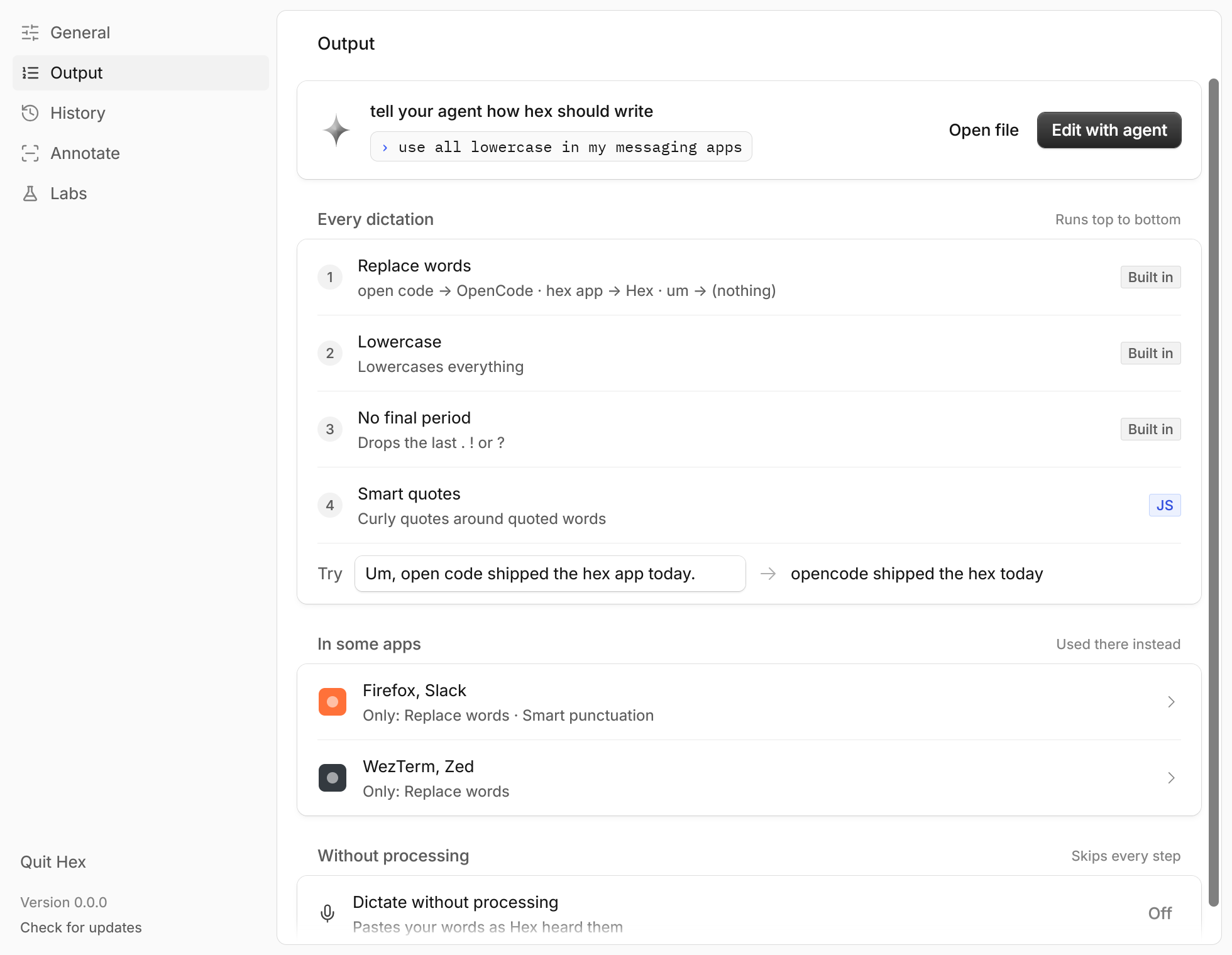
Hex output: the steps every dictation runs, a Try box, and different steps per app Hex history: past dictations, a search field, and one entry's raw transcript, app, processing and model

Speech models

Hex downloads one model the first time it runs and transcribes with it on your machine from then on. On an English system that's Parakeet Unified English: it writes while you talk, so the text is ready when you let go. Other languages start with the model recommended for them. That model also serves meetings and hex transcribe.

Settings' picker offers more, among others:

  • Parakeet v3: 25 European languages, and it hears which one you speak
  • Cohere Transcribe: the fewest wrong words, in 14 languages; a big download
  • Whisper large-v3-turbo: almost any language, and it reads your vocabulary
  • Qwen3-ASR 0.6B: Chinese and 29 more, and it reads your vocabulary
  • SenseVoice Small: Chinese, Japanese, Korean and English; a small download
  • Nemotron 3.5 ASR: writes while you talk, in 27 languages
  • Granite Speech 5.0: IBM's model, seven languages, with punctuation
  • one-language models: ivrit.ai Whisper for Hebrew, GigaAM v3 for Russian, NB-Whisper for Norwegian, KB-Whisper for Swedish, QwenCleo-ASR for Egyptian Arabic
  • more English models: Parakeet v2 and Underdog Bark 3.0

Add a GGUF model of your own with "Add model file…" in the picker; see your own speech models.

Downloads

Stable is the current release. Dev is the newest build of dev and updates itself from the dev channel.

Platform Stable Dev
macOS (Apple silicon) DMG DMG
Windows x64 Installer Installer
Windows ARM64 Installer Installer
Linux x86_64 Executable Executable
Linux x86_64 (Debian, Ubuntu) .deb .deb
Linux x86_64 (Fedora, openSUSE) .rpm .rpm
Linux ARM64 Executable Executable
Linux ARM64 (Debian, Ubuntu) .deb .deb
Linux ARM64 (Fedora, openSUSE) .rpm .rpm

Or install with:

  • Homebrew: brew install --cask anomalyco/tap/hex
  • AUR: yay -S hex-bin
  • install script (Linux): curl -fsSL https://anoma.ly/hex/install-linux.sh | sh
  • Nix (Linux): nix profile add github:anomalyco/hex

Command line

hex transcribe meeting.m4a prints a recording's transcript, whether or not the app is running. It reads WAV, AIFF, CAF, FLAC, MP3, Ogg, WebM, and MP4/M4A/MOV, including a video's soundtrack. The same hex controls the running app (hex status, hex dictation, hex settings); see docs/cli.md.

On macOS the CLI is inside the app. Homebrew links it for you; otherwise link it somewhere on your PATH that you own:

ln -s /Applications/Hex.app/Contents/MacOS/hex ~/.local/bin/hex

Linux and Windows installs put hex on your PATH.

More docs are in docs/.

Contributing

We don't take pull requests. Open an issue describing the bug or idea, and our agents usually turn it around fast.

MIT licensed.
